|
Add the two new images on our gradient filled new file as shown in the next image:

We need to merge the two images in one layer. To do this click on the top layer and hit the key combination: Ctrl + E. On your right side, where the layers of your file are shown you'll be able to see this change:
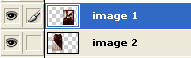 merged -> merged -> 
|
